Driving a Radeon GPU from the Intel Galileo
Before its discontinuation in 2017, Intel released several firmware updates for its Galileo boards. While successive versions provided improved Arduino compatibility, extended hardware support, and bug fixes, the Linux kernel used was never upgraded. All published firmware versions use kernel 3.8.7, extended with (at the time of the final public firmware release, version 1.1.0) some 26 patches.
A Board Support Package for firmware version 1.2.1 based on kernel 3.14 was released to partners in early 20171, but a ready-to-use firmware upgrade was never released to end users, probably due to the aforementioned cancellation of the Galileo product line.
As noted in my previous post on the Galileo, I was interested in seeing if the Mini PCIe slot on the Galileo could drive an era-appropriate GPU. A few weeks ago I managed to acquire a Radeon HD 6350 from 2011 for a few euros, so I also ordered a cheap Mini PCIe to PCIe x16 riser from Amazon so I could finally get started on this project :-)
To limit the number of variables, I decided to first try to get the GPU working under Linux before heading back to DOS.
Linux on the Galileo #
Intel's goal with the Galileo was to provide an Arduino-compatible board. Most Arduinos (especially those available at the time) are based on Atmel microcontrollers, while the Galileo is of course based on the x86 Quark SoC. To achieve Arduino compatibility Intel developed a software solution that acts as an interface between the Arduino libraries and Galileo I/O, and also simulates the flashing of a program as is normally done on a microcontroller. This solution runs on a Linux kernel and in a minimal userspace.
As this solution is relatively small, and to keep costs down, the Linux kernel and userspace are stored on the onboard SPI flash memory, where the firmware (EDK II), bootloader (GRUB), system configuration (e.g. MAC addresses) and the 'flashed' Arduino sketch also reside. While it is amazing they managed to fit all this in 8 MB, this of course means this kernel has very limited hardware support2.
Building a kernel with Radeon support #
Because of the extreme size limits mentioned, the Galileo kernel does not contain the Radeon driver. If we want to see if we can get the HD 6350 working, we'll first need to build a kernel containing its driver. To make matters more complicated, modern GPUs (as well as a lot of other hardware) require firmware to be uploaded by the kernel before they can be used.
To keep the scope limited, I decided on the following approach:
- Rebuild kernel 3.8.7 with the Intel-provided patches. This is a known-good configuration, thus limiting the number of variables at play.
- Reuse the kernel configuration from the version 1.1.0 firmware. This can be extracted from a running Galileo by reading and decompressing
/proc/config.gz. - Build the driver into the kernel as opposed to building it as a module, and inline the firmware into the kernel instead of loading it from the filesystem. This way, I could reuse the existing userspace (which as you may remember is on the SPI and thus has no space for the module or firmware).
- Boot the kernel from a microSD card. The default configuration of the GRUB bootloader on the Galileo makes this very easy: it checks attached SD and USB devices for
/boot/grub/grub.confand parses them if found. - Build the kernel inside an era-appropriate container. Modern toolchains are often more strict and are thus unable to build older kernel versions. For kernel 3.8.7 I settled on Debian 8 (Jessie) from 2015-2018, running GCC 4.9.
I wrote a small set of scripts that do the following:
- Build a container with the required toolchain and libraries
- Download the required kernel source as well as the needed firmware
- Apply the patch set to the kernel source
- Build the kernel inside the container based on the selected configuration:
- Stock: the exact kernel configuration extracted from the Galileo
- Radeon: the Galileo kernel configuration, extended with the Radeon driver, required framebuffer and DRM settings, and inlined GPU firmware
- Prepare a directory whose contents can be copied directly to an SD card. It contains the built kernel(s) as well as a GRUB configuration file that is picked up by the bootloader.
Hardware setup #
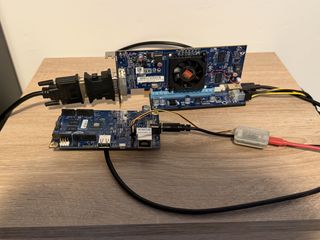
Now that we have a kernel with Radeon drivers and firmware, we can move on to setting up the hardware side. I used the following - admittedly cursed - setup:
Testing the complete setup #
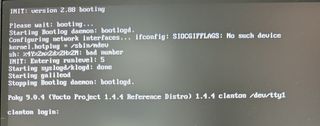
After inserting the SD card and booting the Galileo, this surprisingly resulted in video output on the first try! dmesg nicely shows the driver being initialized and the firmware being loaded.
Kernel upgrades #
At this point, I was wondering how difficult it would be to port a newer kernel version to the Galileo. During the lifetime of the Galileo and its Quark SoC, Intel engineers upstreamed a lot of the patches included with BSP 1.1.0 / kernel 3.8.7. I decided to try the following:
- Port kernel 4.20.17, the last 4.x release. This is quite a large jump (February 2013 -> December 2018) and as such would probably include all of the upstreamed Quark patches.
- If the 4.20.17 port succeeds, port kernel 5.19.17, the last 5.x release. This brings us to July 2022.
- If the 5.19.17 port also succeeds, port the latest version. At the moment of writing (June-July 2026), this is kernel 7.1.2. These ports will reuse the scripts used to build 3.8.7, so we can easily build both the default and the Radeon kernels.
4.20.17 port #
As expected, this port required the most changes out of all three. A lot of Quark-specific settings were added in place of the patch set, most of them in kernel 3.10:
CONFIG_IOSF_MBI, required for all Intel SoCs.CONFIG_X86_INTEL_QUARK, required for Quark support.CONFIG_INTEL_IMR, enabling Quark-specific registers.CONFIG_EFI_CAPSULE_QUIRK_QUARK_CSH, because the Quark does not adhere to the UEFI specification.CONFIG_INTEL_QUARK_DTS_THERMALfor supporting the temperature sensor on the SoC.CONFIG_MFD_INTEL_QUARK_I2C_GPIO, upstream support for I2C and GPIO on the Quark.CONFIG_GPIO_DWAPB, Synopsys DesignWare GPIO driver.CONFIG_MFD_PCA9685was superseded by the generic PWM versionCONFIG_PWM_PCA9685(in kernel 3.11).CONFIG_TI_ADC108S102, support for the Texas Instruments ADC108S102 and ADC128S102 (in kernel 4.2).
The custom Quark UART driver (added by the patch set) was also superseded by Intel's standardized 8250_lpss UART driver. This required a change in the device name in the kernel command line:
console=ttyQRK1,115200n8 -> console=uart8250,mmio32,\$EARLY_CON_ADDR_REPLACE,115200n8
$EARLY_CON_ADDR_REPLACE is the address of the UART's memory-mapped I/O, and is passed by GRUB.
I also updated the build container to Debian 10 (Buster) with GCC 8.3.0, to keep the release dates of the kernel and toolchain roughly in sync.
At this point, I also wanted to switch to an SD-based userspace, so we could include the firmware on-disk instead of in the kernel. At first, I attempted to clone the initramfs from the SPI to a second SD partition, but eventually I settled on a custom, BusyBox-based initramfs. The BusyBox ramdisk is also built by the container. It took a few tries to get the correct BusyBox build options set, because the Quark implements a relatively small subset of the x86 architecture: there is no support for SIMD instruction sets (MMX, SSE), no hardware-accelerated SHA1/SHA256/AES and so forth. Eventually, I got both the default and Radeon kernels working.
5.19.17 port #
This port was much easier than the 4.20 port, as the mainlining process had been finished at that point. make olddefconfig was used to set the default values for newly introduced options. This immediately resulted in a working build.
7.1.2 port #
Another relatively easy port: make olddefconfig was again used to set the default values for newly introduced options. The build container was updated to Debian 13 (Trixie). The only changes were required on the userspace side: the new toolchain targets the i686 (Pentium Pro) microarchitecture by default, while the Quark implements the i586 microarchitecture.
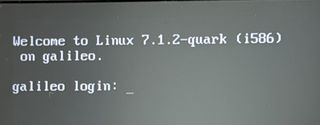
The end result: a discontinued, entry-level SoC from 2013, running the latest kernel and BusyBox releases and driving a dedicated GPU:
While I'm not exactly a fan of Intel, their dedication to upstreaming patches is something ARM users can only dream of, even in 2026.
Source #
The configurations and scripts needed to build all mentioned kernel versions in both the default and Radeon configurations are available on my Forgejo instance:
- branch
mainbuilds the original 3.8.7 kernel - branch
port-4.20builds the 4.20.17 kernel - branch
port-5.19builds the 5.19.17 kernel - branch
port-7.1builds the 7.1.2 kernel
Remarks #
1: The 1.2.1 BSP can be found around the internet. I haven't attempted to build it myself, as it requires a pretty specific build environment setup, and the 3.14 kernel it includes is also pretty dated at this point.
2: The system I'm writing this post on runs Fedora 44. Its kernel (version 7.0.14 at the time of writing) is 18 MB large - and that's excluding the drivers built as kernel modules, which live under /lib/modules and take up another 218 MB!
3: The riser is powered via a SATA power connector, which I've attached to a USB-to-SATA adapter for 3.5 inch hard drives. This can deliver up to 20 watts of power to the GPU, which nicely fits the HD 6350's TDP of 19 watts. Also note the adapter between the video card and the DVI cable: this GPU uses an obscure connector named DMS-59, which provides two DVI or two VGA outputs via a breakout cable. Like I said: quite a cursed setup :-)
- Previous post: Running MS-DOS on the Intel Galileo